






Cart
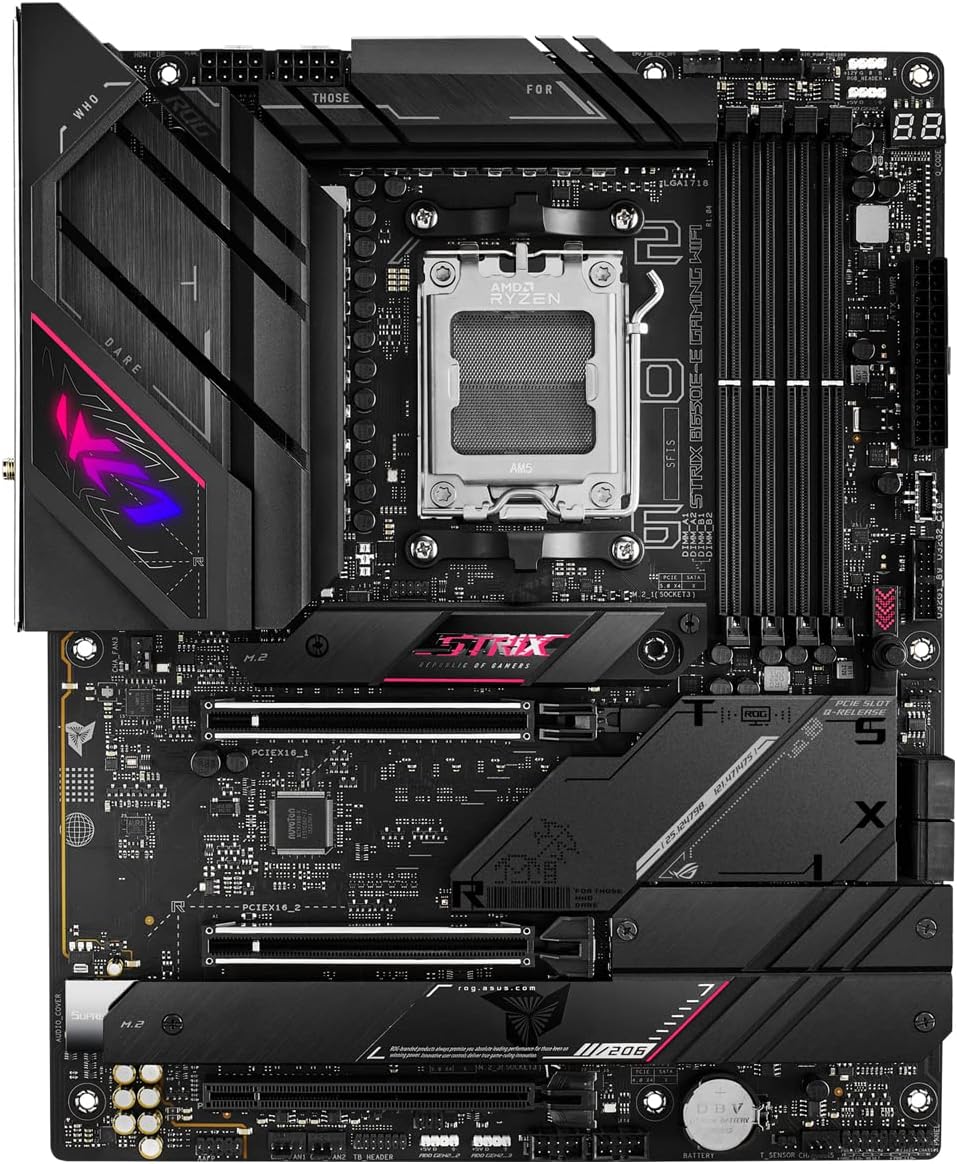
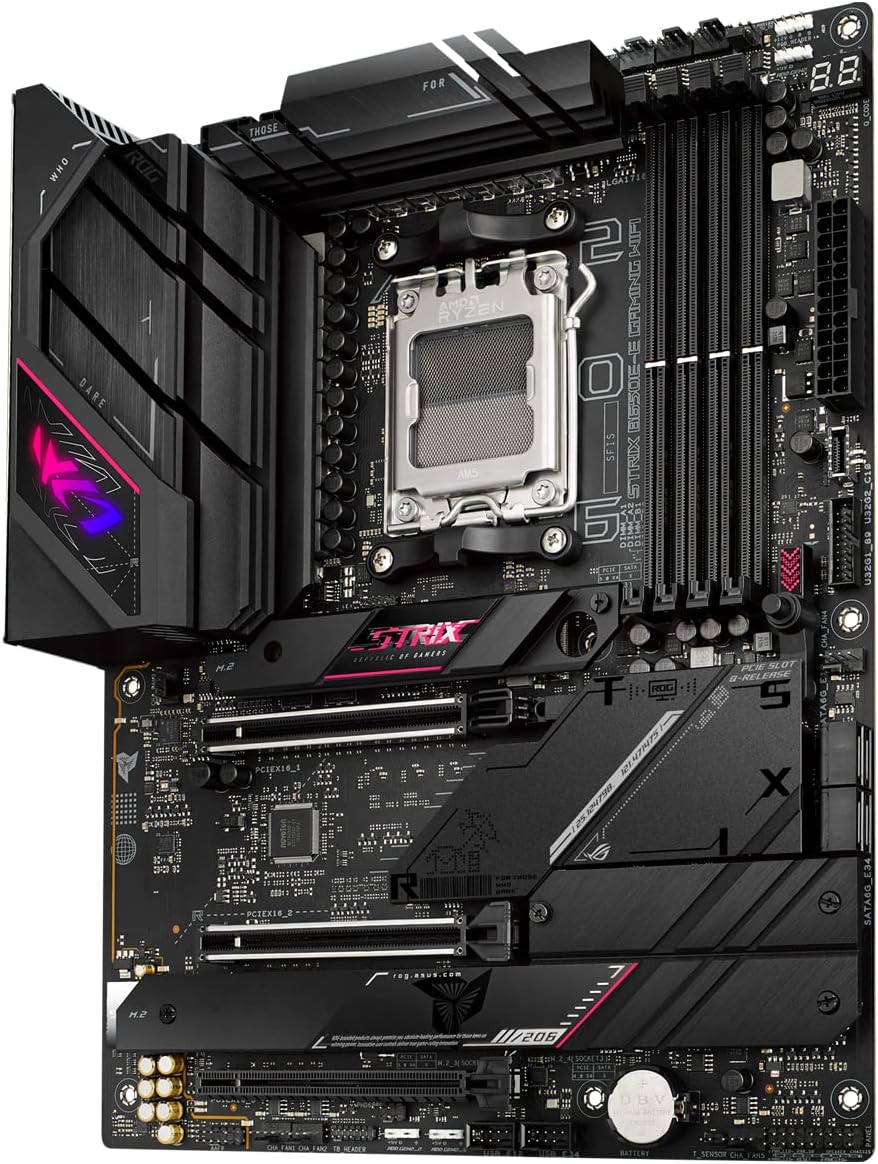
ASUS ROG Strix B650E-E Gaming WiFi Motherboard Socket AMD AM5 | Ryzen 7000, ATX, DDR5 Memory, 16+2 Power Stages, USB 3.2 Gen 2x2 Type-C, PCIe 5.0, Q-Release, WiFi 6E, Aura Sync E-E Gaming WiFi ROG B650
Configuration
Style Name
Brand: ASUS
- This motherboard is ready for the future: AMD AM5 socket supports AMD Ryzen 7000 Series desktop processors for maximum performance
- Experience reliable performance with this ASUS ROG motherboard: the robust power supply with 16 two teamed power stages and high-quality components ensures stability
- The B650 E-E motherboard offers optimized VRM cooling: massive heat sinks and strategically milled airflow channels ensure maximum stability, even under load
- This gaming motherboard is well equipped: Next-Gen M2 support with two PCIe 50 and two PCIe 40 slots, all with heat sinks to unlock the full potential
- Benefit from a variety of connectivity options with this WiFi motherboard: USB 32 Gen two × two Type-C, front panel connection, eleven USB ports, PCIe 50 x16 SafeSlots, HDMI 21 and DisplayPort 14
ASIN:
- B0BHHX6D19
| brand | ASUS |
|---|---|
| model | 90MB1BB0-M0EAY0 |
| weight | 1.2 Kilograms |
| availability | In stock |
| sold by | AGEM CZ |
| CPU socket | Socket AM5 |
| Compatible devices | Personal Computer |
| RAM memory technology | DDR5 |
| Compatible processors | AMD Ryzen 7000 Series |
| Chipset type | AMD B650 |
| Bellek Saat Hızı | 2133 MHz |
| Platform | Windows |
| Model name | ROG STRIX B650E-E GAMING WIFI |
| CPU model | Ryzen 7 |
| Processor Socket | Socket AM5 |
| Memory Clock Speed | 2133 MHz |
| Memory Storage Capacity | 128 GB |
| Ram Memory Maximum Size | 8 GB |
| Main Power Connector Type | ProCool |
| Graphics Card Interface | PCI Express |
| Available Memory Slots | 4 |
| Number of Ports | 18 |
| S/PDIF Connector Type | Optical |
| System Bus Standard Supported | PCIe 5.0 |
| Total SATA Ports | 6 |
| USB 2.0 | 1 |
| Total USB Ports | 12 |
| Number of Ethernet Ports | 1 |
| Total PCIe Ports | 2 |
| Chipset Family | AMD B650 |
| Brand Name | ASUS |
| Model Number | 90MB1BB0-M0EAY0 |
| Manufacturer | ASUS |
| Unit Count | 1.0 count |
| Global Trade Identification Number | 04711081906209 |
| Country of Origin | China |
| Box Contents | Keyboard |
| Item Weight | 1.2 Kilograms |
| Manufacturer Part Number | 90MB1BB0-M0EAY0 |
| Product Warranty | Manufacturer's warranty |
| ASIN | B0BHHX6D19 |
| Customer Reviews | 4.2 4.2 out of 5 stars (529) 4.2 out of 5 stars |
| Item Dimensions L x W x H | 24.4L x 5W x 30.5H centimetres |
- This motherboard is ready for the future: AMD AM5 socket supports AMD Ryzen 7000 Series desktop processors for maximum performance
- Experience reliable performance with this ASUS ROG motherboard: the robust power supply with 16 two teamed power stages and high-quality components ensures stability
- The B650 E-E motherboard offers optimized VRM cooling: massive heat sinks and strategically milled airflow channels ensure maximum stability, even under load
- This gaming motherboard is well equipped: Next-Gen M2 support with two PCIe 50 and two PCIe 40 slots, all with heat sinks to unlock the full potential
- Benefit from a variety of connectivity options with this WiFi motherboard: USB 32 Gen two × two Type-C, front panel connection, eleven USB ports, PCIe 50 x16 SafeSlots, HDMI 21 and DisplayPort 14
Titel: Asus ROG Strix B650E-E Gaming WiFi – solide Premium-Plattform für AMD Ryzen 7000+
Ich habe dieses Mainboard im Zusammenspiel mit Ryzen-7000-Prozessoren getestet und schätze Folgendes:Verarbeitungsqualität: Hochwertige Bauweise, robuste Spannungsversorgung, kühlende VRMs und solide Phasenstruktur. Stabile I/O-Deckung.Leistung: Sehr gute Basis für Gaming- und Creator-Workloads. Breite Unterstützung für DDR5, schnelle PCIe 5.0-Anbindung, und zuverlässige Stabilität beim Ryzen 7000er-Stack.Übertaktung/Overclocking: Gute Möglichkeiten für CPU- und RAM-OC mit übersichtlichem BIOS. Angemessene Spannungs- und Wärmeüberwachung.Anschlussvielfalt: Umfangreiche PCIe-/M.2-Slots (inkl. ausreichender Kühlung für NVMe), USB-Ports der neuesten Generation, integriertes WiFi 6E, Bluetooth, duale Ethernet-Optionen in manchen Varianten.WLAN/Networking: Integriertes WiFi 6E bietet stabile Wireless-Konnektivität, ergänzt durch Gigabit-/2.5GbE je nach Modell. LAN-Optionen variieren je nach SKU, prüfen nicht jedes Modell.Ausstattung: Hochwertiges Audio-Subsystem, hochwertige Netzteil-Konnektivität, gute BIOS-Unterstützung und hilfreiche Features wie AI-Overclocking/AI-Net-Optimierung (je nach Firmware).Wert: Premium-Preis, aber eine zukunftssichere Plattform mit vielen Features.
High-End Gaming trifft auf Top-Ausstattung
Das ASUS ROG STRIX B650E-E GAMING WIFI Mainboard ist ein echtes Highlight für jeden Gaming-Enthusiasten, der das Beste aus seiner Hardware herausholen möchte. Von der beeindruckenden Leistung bis hin zur durchdachten Ausstattung – dieses Mainboard hat mich restlos überzeugt.Leistung und Zukunftssicherheit:Mit Unterstützung für PCIe 5.0 und DDR5-Speicher ist das Board bestens für die Zukunft gerüstet. Die beiden PCIe-5.0-Slots ermöglichen ultraschnelle Verbindungen für Grafikkarten und SSDs, während vier M.2-Steckplätze mit soliden Kühlkörpern für optimale Temperaturen sorgen. Ob Overclocking mit dem Dynamic OC Switcher oder die Nutzung von AMD Precision Boost Overdrive – hier wird kein Performance-Wunsch offen gelassen.Konnektivität:Das Board glänzt mit einer Vielzahl von Anschlüssen: USB 3.2 Gen 2x2 Typ-C, Wi-Fi 6E und 2.5G-LAN bieten alle modernen Standards. Die Front-Panel-Anschlüsse sind besonders praktisch für kompakte Gehäuse.Design und Kühlung:Das aggressive, aber edle Design mit Aura Sync Beleuchtung fügt sich nahtlos in jedes Gaming-Setup ein. Die massiven VRM-Kühlkörper und optimierte Wärmeableitung garantieren Stabilität selbst bei intensiven Gaming-Sessions.Setup und Benutzerfreundlichkeit:Dank der Q-Release-Funktion für PCIe-Slots wird das Installieren und Entfernen von Grafikkarten zum Kinderspiel. Der BIOS-Flashback-Button ist eine Rettung für Upgrades, ohne dass ein Prozessor benötigt wird.Fazit:Für Gamer, die das Maximum aus einem Ryzen-7000-System herausholen möchten, ist das ASUS ROG STRIX B650E-E eine klare Kaufempfehlung. Es kombiniert Top-Leistung, modernes Design und zahlreiche praktische Features. Absolute Schulnote 1!
The perfect foundation for the AM5 platform – ROG Strix B650E-E Gaming WiFi
A long-term investment with minimal compromises. After thoroughly researching the market and debating between standard B650 and the newer X870 boards, I ultimately decided on the ROG Strix B650E-E Gaming WiFi. I don't regret it, but there are a few things you should be aware of during the build.Why I chose this: Instead of a standard B650, the B650E-E offers PCIe 5.0 support (both for GPU and M.2 slots), which far exceeds base models, ensuring it won't become a bottleneck years down the line. I didn't find the premium for X870 boards justifiable compared to the benefits received; the B650E-E is a mature, high-end board with a robust power delivery (16+2+1 phases) that provides a much more stable environment for my Ryzen 9800X3D processor. The ASUS BIOS and build quality are top-tier, which is exactly what I was looking for.Pros: The ROG Strix build quality is solid to the touch, and the VRM cooling is excellent—it doesn't overheat even under heavy load. PCIe 5.0 is present everywhere I might need it. It handled my Kingston Fury Beast 6000MHz CL30 RAM immediately without any issues, and the ASUS UEFI BIOS remains the best on the market, allowing for precise adjustment of every parameter.Cons: The biggest drawback is "line sharing." Since the board is packed with features, you have to be very careful where you plug things in; if you fill it up with M.2 SSDs, the speeds of certain slots might be restricted or they might shut off entirely. You must check the manual before plugging everything in. Furthermore, software can be a chaotic experience: ASUS Armoury Crate and other controllers (SignalRGB, TriXX) can conflict with each other, so for a quiet system, it's better to manage fans manually in the BIOS or via FanControl instead of using those software suites.Summary: If you're looking for a motherboard that represents the premium tier without dealing with the high prices or growing pains of X870 boards, this is one of the best choices. You have to plan your components carefully due to line sharing, but in exchange, you get a rock-solid, stable foundation
B650E-E in Sachen Preis/Leistung unschlagbar.
Ich bin echt begeistert vom B650E-E – das Board sieht super aus, die Verarbeitung ist top und die RGB-Beleuchtung sehr dezent, passt perfekt ins Gehäuse.Beim Overclocking merkt man sofort, wie stabil die Spannungsversorgung arbeitet, selbst bei meinem Ryzen 7 lassen sich Takte problemlos erhöhen.Auch die Temperaturen von VRM und Chipsatz bleiben unter Last niedrig, was mir ein sehr sicheres Gefühl gibt.Das RAM-Overclocking läuft zuverlässig, meine DDR5-Module erreichen die beworbenen XMP-Frequenzen ohne Probleme.Insgesamt ein rundes Board für Gaming und OC, das Design, Leistung und Kühlung perfekt kombiniert.
Rock Solid und extrem performant
Alle Details wurden schon ausreichend beschrieben, das 650'er ROG Strix ist auch 2026 noch eine Bank! Wer ein grundsolides, hoch performantes Board als Basis für sein AM5 System sucht, kann bedenkenlos zuschlagen.Vor dem ersten Start eben das BIOS via Q-Flash auf aktuellen Stand bringen, hochfahren, einstellen, glücklich sein.Natürlich sollte man dem Board auch ein vernünftiges Netzteil zur Seite stellen. Dann steht einer guten Leistung nichts im Weg.Bei den hier teilweise beschriebenen Problemen sollte man vermutlich vor dem Bildschirm ansetzen. Asus ist nach wie vor absolut verlässliches Produkt, hat tolle Boards am Start.
Nie wieder
Einmal Asus,nie wieder Asus.Bein booten zeigte das Board den Fehlercode 0d an und Asus konnte nicht helfen,weil die selber nicht wussten wie die den Fehler einordnen sollen.Ich werde mir nie wieder ein Board von Asus kaufen.
Gutes Board mit allem was man braucht
Wer sich überlegt welcher Chipsatz es nun werden soll, dem kann ich nur den B650E ans Herz legen, der Aufpreis zum X670(E) von Stand jetzt 200€+ lohnt sich definitiv nicht. Mit dem B650E Chipsatz auf dem Asus B650E-E Gaming Wifi hat man alles was ein normaler User braucht, 1x PCIe 5 für eine NVME, sowie zwei weitere PCIe 4 Steckplätze.Das Board hat zwar noch einen zusätzlichen PCIe 5 Steckplatz, dieser teilt sich aber die Lanes mit der Grafikkarte wodurch diese nur noch 8x angebunden ist. Ebenso ist der erste Slot für die Grafikkarte ein PCIe 5 Slot.Die NVMEs können ohne Werkzeug direkt am Board befestigt werden, allerdings geht dies nur so lange die SSD selber keinen Kühler hat. Den BeQuiet Kühler musste ich leider abnehmen, allerdings sind die Kühler auf dem Board mehr als ausreichend, meine beiden SSDs werden um die 45 Grad warm.Das Board ist gut verarbeitet und lief ohne Probleme direkt mit meinem 32GB DDR5 6000 CL30 Kit von Gskill und dem 7700X. Booten dauert bei AM5 etwas länger, vom Kaltstart dauert es bei mir ca. 30sek bis das Bios lädt, der PC ist dann aber 3sek später im Login Screen und direkt einsatzbereit. Ich denke mit weiteren Bios Updates wird das noch besser, war bei AM4 ja genauso zum Start. Schön finde ich den spärtlichen Einsatz von RGB sowie die Einstellungen von Aura direkt im Bios.Das Beste kommt zum Schluss, wer wie ich einen dicken Luftkühler wie den Noctua NH-D15 benutzt und öfter mal die Grafikkarte wechseln muss, für den ist das beste Feature auf dem Board der Knopf um die Verriegelung des PCI Slots der Grafikkarte zu lösen. Endlich ist kein Schraubendreher mehr nötig, um die Verriegelung zu lösen, wo die Gefahr besteht abzurutschen oder aber gleich den ganzen CPU Kühler demontieren zu müssen, weil man mit den Fingern einfach nicht dran kommt. Danke Asus.
Unbrauchbarer Sound - Lieferung ohne Verpackung
Vorweg ein Wort zur Lieferung: Ich finde es unakzeptabel, dass ein 300€ Board nicht verpackt wird (war noch nicht mal versiegelt) und einfach die Aufkleber auf den Karton geklebt werden. Hatte ich zuvor schon mit einer Grafikkarte erlebt, die 700€ gekostet hat! Unakzeptabel!Ich habe schon wirklich schon viele PCs aufgebaut. Bei diesem Mainboard habe ich Wert auf folgende Punkte gelegt:- ATX full size, damit noch min. 2 PCIe Slots frei sind für Erweiterungen- Viele USB Ports (10+) am Backpanel- Guter Onboard Sound - habe eine gute 5.1 Anlage dran- passende Software zur Steuerung des Sounds- Gute Versorgung mit Spannungswandlern (VRMs)- 4 SATA AnschlüsseWas nicht sein braucht:- WLAN / BT- mehr als 2 M2 Slots- LED Lichtspiele- Fancy KühlerdesignIch komme von einem sehr guten AM4 System, das Board war ein Gigabyte 470er mit ALC1220 Sound und ansonsten passender Features. Hat seiner Zeit 140€ gekostet. Auch bei diesem Board war die Konfiguration des Sounds schon etwas umständlich, da die Realtek Software einfach den Soundmanger nicht installieren wollte. Letztlich hab ich das aber hinbekommen. CPU war eine Ryzen 5950x.Zu diesem Board aus meiner Sicht:+ hochwertige Verarbeitung, unerwartet schwer (soll ein 8 layer PCB sein), gutes Kühlungsdesign+ gute Ausstattung mit Features:viele USB, 4 M2 Slots, PCIe Slots, Fan Headers, Funk, etc.-- Sound völlig unbrauchbar, sehr lautes brummen*- BIOS sehr gewöhnungsbedürftig und unübersichtlich, viele kryptische Benennungen, für die jeder Hersteller andere Bezeichnungen zu haben scheint. Jedenfalls für Leute die nicht schon länger mit ASUS arbeiten. Allerdings auch viele Einstellmöglichkeiten.- BIOS war nicht aktuell und kam mit den Ryzen 9xxx CPUs nicht klar. Dafür war das Flashen recht einfach - man muss eben nur vorher alles vorbereiten (Download, umbenennen, USB Stick) !-- Die Software ArmouryCrate: scheint (immer noch) buggy zu sein, hoher System Load, mehrfach Abstürze gehabt, ein Graus. Die Soundsteuerung funktionierte nicht, konnte nicht auf 5.1 umstellen, auch andere Features nicht vorhanden. Kopfhörerumschaltung funktionierte nicht.- viel zu hoher Preis (280€), ist aber ein allgemeines AM5 Problem* Sound:Mein größtes Ärgernis ist tatsächlich der Onboard Sound, eigentlich ist der Codec ja recht brauchbar, die Realtek Software ist eigentlich recht umfangreich (400mb) und hat auch eine brauchbare Soundsteuerung (kenn ich vom Gigabyte)- jedenfalls ist eigentlich alles vorhanden. Nur kann man das alles nicht installieren und funktioniert eben auch nicht!Der neue Codec (ALC4080) soll dem Vernehmen nach eigentlich ein 1220er sein, der nicht per PCIe angbunden ist, sondern via USB. Sollte also eigentlich kein Problem sein, andere USB Lösungen arbeiten sehr gut.Nur brummen die Lautsprecher eben sehr laut, wenn kein Ton (z.B. Musik) läuft. Das Brummen ist so laut, dass meine Lautsprecher nicht mehr in den Standby schalten - interssanter weise auch wenn der PC heruntergefahren ist.Wenn man das Problem googelt, findet man viele Einträge und auch Lösungsansätze, interessanter Weise schon aus '22. Inzwischen gibt es ein Update für das Soundkartenbios, das eigentlich Abhilfe leisten sollte - was es aber bei mir gar nicht tut.Ich kenne solche Probleme auch aus der HiFi Welt (Brummschleifen), die Möglichkeiten hab ich schon getestet, das ist es nicht. Interssant ist eben auch, dass das Brummen nur in stillen Momenten auftritt, sobald ein Signal anliegt, geht das Brummen auf fast null, was eigentlich darauf hinweist, dass sich das Problem via Software lösen lassen sollte.Weiter ist die Software, wie beschrieben untauglich. Warum lässt es ASUS nicht zu, dass die Realtek Software vollständig istalliert wird ? Natürlich nur um die ASUS ArmouryCrate zu pushen - ätzend.Fazit:Ich bin recht enttäuscht wegen der Mängel und dass es dem Hersteller nicht gelingt nach 2 Jahren einen brauchbaren Sound zu installieren. Zumal der ALC1220 eigentlich sehr gut funktioniert hätte und AMD CPUs den auch unterstützen. Den ALC4080 gibt es nur, weil Intel CPUs angeblich keinen PCIe Sound nativ unterstützen sollen (Info aus dem Web). Es besteht also eigntlich keine Notwendigkeit für das misslungene Experiment ALC4080!Ein weiteres Ärgernis ist die Software ArmouryCrate. Wobei man sagen muss, dass andere Hersteller sich auch nicht mit Ruhm bekleckern!Ich hatte ernstlich überlegt, das Board zurückzuschicken, nur hätte das eine hohen zeitlichen Aufand bedeutet, es hängt ja auch die Windows Installation dran.Ich habe mir mit einer Creative SB Z se beholfen, die sehr gut funktioniert.ASUS war ja mal ein guter Hersteller, der sehr hochwertige Boards gemacht hat. Das nächste Mal würd ich wieder zu Gigabyte greifen, hatte ich eigentlich gute Erfahrungen, auch wenn die auch nicht perfekt sind. Da gab es aber ein passendes Board mit ALC1220 Codec, soweit ich mich erinnern kann.
Calidad máxima
Es una placa base del chipset B650E pero como si fuera una X670E porque se siente muy premium, sus acabados son increíbles, tiene todo tipo de conexiones en su parte trasera, buenos disipadores y fiabilidad en todos sus detalles. Me alegro de decantarme por adquirir una placa base ROG, lo recomiendo mucho.
Broken Mobo
I got a motherboard which couldnt detect RAM. It took me two weeks and also I had to leave it at a repair shop So i could figure out the issue. When they changed motherboard it finally worked. Amazon refuse to pay me for it. I had to pay $70 to get their mobo checked out. What a joke also wasted two weeks. Very very dissapointed that they refuse to offer the money which is their fault for giving me a broken product. Never buying again because I can’t trust AmazonEdit: after messaging their support once again they did actually pay me. So I am satisfied with the support from Amazon.
Très stable et performante
Associée à un 7800x3d, cette carte mère s'avère très performante et stable.Il y a un afficheur lcd permettant de contrôler les codes erreurs ainsi qu'un bouton à l'arrière de clear cmos.De plus elle est prête pour le futur avec sa ddr5 et son port pcie 5.
Excellent choice
I went with the ASUS ROG Strix B650E-E Gaming WiFi for my AM5 build, and honestly, I think it’s better than a lot of the more expensive “higher-end” boards out there.The build quality is excellent. Everything feels solid, well laid out, and premium without paying crazy flagship prices. Installation was smooth, and it paired perfectly with my Ryzen CPU right out of the box.BIOS is clean and easy to navigate, and tweaking settings wasn’t a headache. Plenty of connectivity too. Lots of USB, solid PCIe support, built-in WiFi, basically everything most people actually need.Performance and stability have been rock solid. No weird issues, no random crashes. For the price, this board punches above its weight. Definitely a great choice for an AM5 setup.Have not tried overclocking, but the VRMs on the board should easlity support it whilst staying cool.
Un mostro di stabilità e potenza
Scrivo questa recensione dopo aver messo a dura prova la ASUS ROG STRIX B650E-E GAMING WIFI in ogni scenario possibile. Dopo settimane di test, posso affermare con sicurezza che si tratta della miglior scheda madre “overkill” della serie B650E.La sezione VRM è estremamente solida e garantisce un’ottima stabilità anche sotto carichi pesanti e sessioni prolungate di overclock. Ho effettuato diversi test sia lato CPU che RAM, spingendo un Ryzen 5 7600 oltre le specifiche di fabbrica senza alcun problema. Grazie alla gestione intelligente del BIOS, anche in caso di overclock instabile la scheda effettua automaticamente il POST in Safe Mode, permettendo di intervenire rapidamente senza dover fare reset manuali.Durante i miei test con XMRig sono riuscito a raggiungere il primo posto in classifica, segno che la piattaforma offre un livello di efficienza e stabilità eccellente.La dotazione è completa e di qualità: il manuale è chiaro, gli accessori sono ben organizzati e ASUS include anche piccoli extra come il portachiavi ROG, che testimoniano la cura nei dettagli.Ho posseduto altre motherboard B650 in passato, ma nessuna si è avvicinata a questo livello di affidabilità e finezza costruttiva. Vale ogni euro speso — una scelta consigliata per chi cerca prestazioni, stabilità e supporto all’overclock di alto livello.
Frequently bought together
Useful add-ons and products customers often order with items like this.
+

+
Total for selected items1275500 IQD


Similar products
Compare alternatives from the same category, brand or feature set.




Product buying guide
This product from ASUS can be reviewed by features, specifications and available options before ordering.
What stands out
- This motherboard is ready for the future: AMD AM5 socket supports AMD Ryzen 7000 Series desktop processors for maximum performance
- Experience reliable performance with this ASUS ROG motherboard: the robust power supply with 16 two teamed power stages and high-quality components ensures stability
- The B650 E-E motherboard offers optimized VRM cooling: massive heat sinks and strategically milled airflow channels ensure maximum stability, even under load
- This gaming motherboard is well equipped: Next-Gen M2 support with two PCIe 50 and two PCIe 40 slots, all with heat sinks to unlock the full potential
Before you buy
- Check the available colors, sizes or styles above before ordering.
- Confirm the dimensions: 24.4L x 5W x 30.5H centimetres.
- Estimated item weight: 1.2 Kilograms.
- Availability information: In stock.
- Compare it with the similar products below if you want another brand, price or feature set.