




Cart
Novation Launchpad Launchpad X Single
Style Name
Brand: Novation
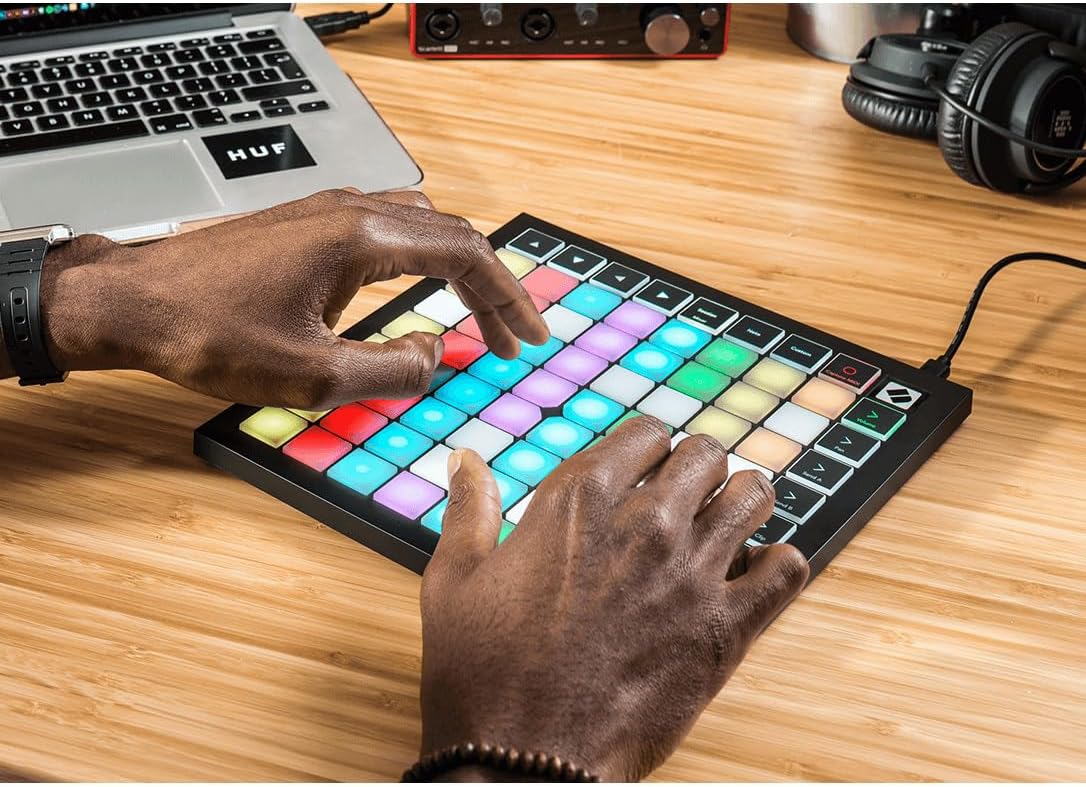
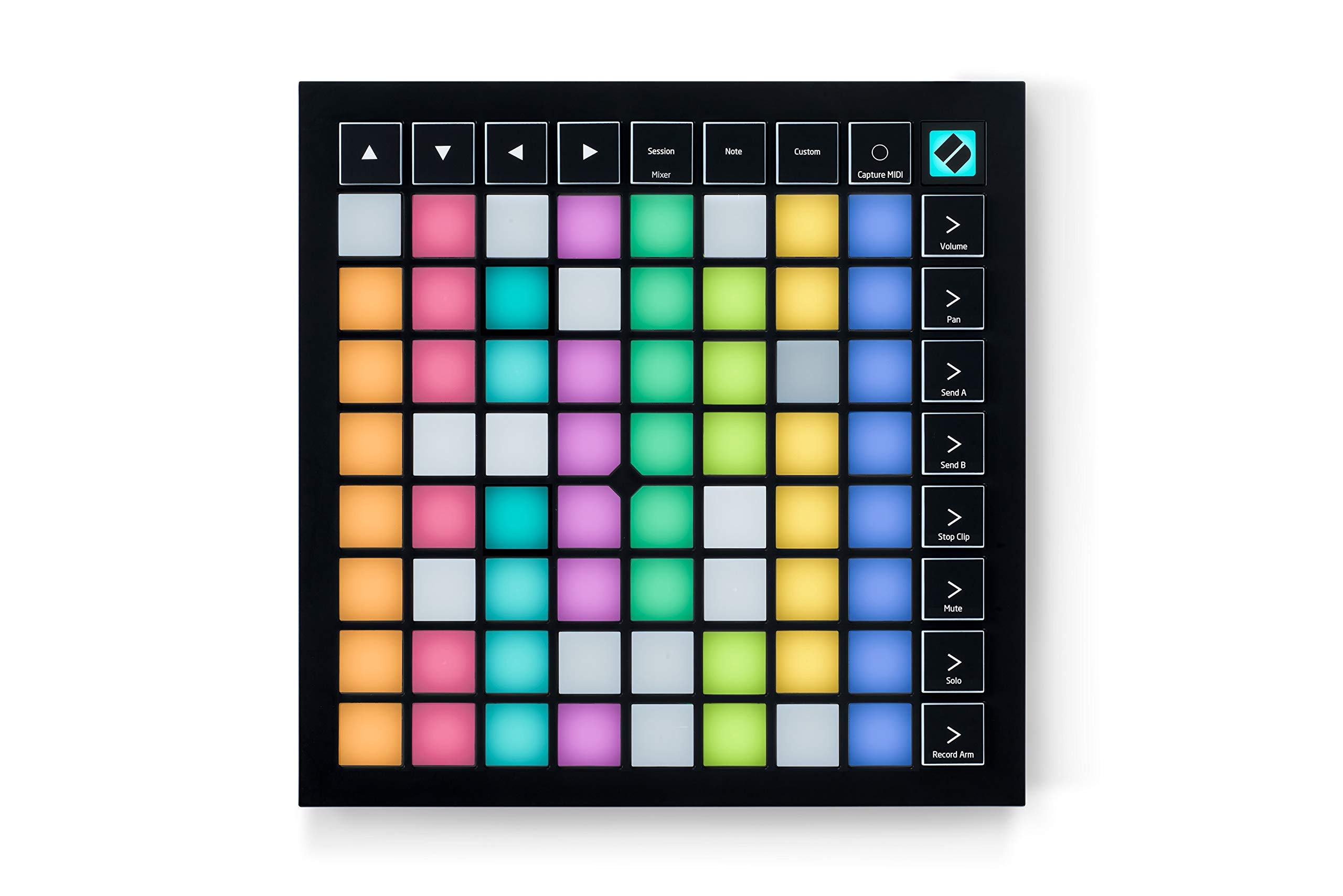
- Take control of your performance – Essential elements of performance control are just a push of a button away: stop, solo, mute and arming the recording. You have access to your levels, panoramic settings and send paths. It doesn't get simpler than Launchpad X: you don't need to install drivers - just plug in and go.
- Dynamic and expressive game - Large touch-sensitive and pressure-sensitive RGB pads give you a perfect image of your Ableton Live and Logic Pro session on your Launchpad X, along with customized session view colors. You can see your clips easier than ever before and can play your instruments dynamically and expressively.
- Our most comprehensive Ableton Live integration - Launch clips and scenes, access the mixer, devices and transport controls, and quantize, duplicate and double without touching the mouse. This makes controlling your performances easier and more tactile. Capture MIDI ensures that you don't lose ideas and stay in the creative flow.
- Personalization with four custom modes - Dive deeper and configure Launchpad X the way you want. With Novation Components, you can customize MIDI mappings and control virtually anything. Four custom modes offer you plenty of personal freedom when designing this essential grid controller.
- DYNAMIC NOTE AND SCALE MODES - Effortlessly play perfect bass runs, melodies, chords and solos in the right key. Launchpad X even detects when you play drums and displays your drum rack in the pad grid. Explore, build and play complex chords with playful simplicity right across the pad grid, quickly finding new harmonies to further enhance your track.
ASIN:
- B07WWZCMP5
| brand | Novation |
|---|---|
| model | AMS-LAUNCHPAD-X |
| color | Multi-coloured |
| material | Plastic |
| weight | 1.94 Pounds |
| availability | In stock |
| Number of keys | 64 |
| Connectivity technology | USB |
| Special feature | Speed sensitive pads, stop, solo and mute control; portable and lightweight |
| Model name | Novation Launchpad X |
| Special Features | Speed sensitive pads, stop, solo and mute control; portable and lightweight |
| Instrument Key | Any |
| Compatible Devices | Laptop, PC |
| Supported Software | Ableton Live |
| Connector Type | USB |
| Hardware Interface | USB |
| Keyboard Description | 64 speed and pressure sensitive RGB pads |
| Control Type | MIDI Controller |
| Platform | Mac, Windows 10, Windows 7 |
| Human Interface Input | Buttons |
| Hardware Platform | PC/Mac |
| Instrument | Drum |
| Total USB Ports | 1 |
| Control Method | Touch |
| Mixer Channel Quantity | 4 |
| Noise Control | None |
| Colour | Multi-coloured |
| Product Style | Launchpad X |
| Material Type | Plastic |
| Outer Material | Plastic |
| Brand Name | Novation |
| Model Number | AMS-LAUNCHPAD-X |
| Included Components | Launchpad X, USB-C to USB-A Cable |
| Model Year | 2019 |
| Manufacturer | Novation |
| Global Trade Identification Number | 00815301001171 |
| Manufacturer Part Number | AMS-LAUNCHPAD-X |
| Country of Origin | China |
| Item Type Name | MIDI Controller |
| Product Warranty | 3-year manufacturer's warranty. |
| Unit Count | 1.0 count |
| ASIN | B07WWZCMP5 |
| Customer Reviews | 4.6 4.6 out of 5 stars (1,223) 4.6 out of 5 stars |
| Item Dimensions D x W x H | 24D x 24W x 2H centimetres |
| Size | Einheitsgröße |
| Item Weight | 1.94 Pounds |
| EU Spare Part Availability Duration | 3 Years |
| GTIN | 815301001171 |
- Take control of your performance – Essential elements of performance control are just a push of a button away: stop, solo, mute and arming the recording. You have access to your levels, panoramic settings and send paths. It doesn't get simpler than Launchpad X: you don't need to install drivers - just plug in and go.
- Dynamic and expressive game - Large touch-sensitive and pressure-sensitive RGB pads give you a perfect image of your Ableton Live and Logic Pro session on your Launchpad X, along with customized session view colors. You can see your clips easier than ever before and can play your instruments dynamically and expressively.
- Our most comprehensive Ableton Live integration - Launch clips and scenes, access the mixer, devices and transport controls, and quantize, duplicate and double without touching the mouse. This makes controlling your performances easier and more tactile. Capture MIDI ensures that you don't lose ideas and stay in the creative flow.
- Personalization with four custom modes - Dive deeper and configure Launchpad X the way you want. With Novation Components, you can customize MIDI mappings and control virtually anything. Four custom modes offer you plenty of personal freedom when designing this essential grid controller.
- DYNAMIC NOTE AND SCALE MODES - Effortlessly play perfect bass runs, melodies, chords and solos in the right key. Launchpad X even detects when you play drums and displays your drum rack in the pad grid. Explore, build and play complex chords with playful simplicity right across the pad grid, quickly finding new harmonies to further enhance your track.
Nippelboard zum Triggern von Audioclips
Das Novation Launchpad X hat sich als unschätzbar wertvolles Werkzeug erwiesen, besonders in meinem Einsatz als Nippelboard im Stil von Stefan Raab für Livestreams. Dieser MIDI-Grid-Controller bietet eine bemerkenswerte Kombination aus Einfachheit und Funktionalität, die ihn zu einem unverzichtbaren Bestandteil meiner Live-Performance macht.Die leicht verständliche Benutzeroberfläche ermöglicht es mir, nahtlos durch meine Soundelemente zu navigieren und sie in Echtzeit zu steuern. Die Tasten sind reaktionsschnell und bieten eine präzise Kontrolle über verschiedene Parameter.Die Plug-and-Play-Funktionalität erleichtert die Integration in meine Arbeitsumgebung erheblich, und die Robustheit des Controllers trägt zur Zuverlässigkeit während meiner Livestreams bei. Die beleuchteten Tasten bieten nicht nur visuelles Feedback, sondern tragen auch dazu bei, eine lebendige und ansprechende visuelle Darstellung für meine Zuschauer zu schaffen.Insgesamt hat das Novation Launchpad X meine Erwartungen übertroffen und beweist, dass es nicht nur ein hervorragendes Werkzeug für die Musikproduktion ist, sondern auch als unterhaltsames Nippelboard für Livestreams einen bleibenden Eindruck hinterlässt. Mit einer soliden Bewertung von 5 von 5 Sternen kann ich diesen MIDI-Grid-Controller uneingeschränkt empfehlen.
good quality
amazing!! I am very satisfy !! recommended!
Leistung.
Bin Laie, das Teil kann sehr viel mehr, als ich erwartet habe.
Klasse Teil
Ich nutze das Gerät mit Ableton. Die Installation war am Mac super einfach und wurde in Ableton ohne mein zutun eingerichtet. Ich nutze das Pad zum starten und aufnehmen von Sessions und schöpfe das Potential somit absolut nicht aus. Die Leuchtkraft der Tasten und der Druckpunkt sind sehr gut.
Hält was es verspricht.
Ein cooles Teil und mit Ableton der Kreativität keine Grenzen gesetzt.Meine Empfehlung 👍
wirklich schönes Teil
Gefällt mir gut, weil gutes Material gut verarbeitet ist, und alle Pads einwandfrei funktionieren. Auch die Downloads der mitgelieferten Software klappten. Und ich kann das Launch-Pad sogar nach kurzer Einarbeitung mit Hilfe des Tutorials bedienen und sowas wie Musik, oder doch zumindest rhythmische Geräusche erzeugen. Macht Spaß - cool!
Begristerung
Mein Enkelsohn 11 Jahre ist glücklich darüber
Schlechte Lieferung
Gerät wurde im original Karton unverschlossen gesendet. Die Verpackung konnte von jedem geöffnet werden, um den Inhalt zu entnehmen. Nicht mal ein Aufkleber zum sichern der Laschen. Die Verpackung war mit Postaufklebern voll geklebt. Beim lösen der Aufkleber geht die Verpackung kaputt.Das Gerät war zum Glück noch in der Verpackung.Das launchpad x ansich ist super
It works in MPC 2.x, including accessing all 8 pad banks (64 pads at a time)
I love this controller.Most people are buying this to use in Ableton, but if you're using MPC 2.x as your DAW and want to access more than one pad bank at a time with physical pads, you know there are exceedingly few options out there. This gets the job done almost perfectly (I'll explain the "almost" below).Before that though, to review the controller more generally, outside of APC, I can say that while other people in the reviews seem to have complaints about the velocity pads, I've found them to be fantastic. To be clear, I'm not using the velocity function - I have it set to activate at full level with the lowest trigger threshold (in the controller's velocity settings), and adjust the velocity as necessary in MPC. Compared to the other controllers I own (The Mpk Mini Mk2 and the MPC Touch) though, these are by far the best in terms of fewest double-hits and in terms of missed-hits/consistent response. I can actually get decent finger drumming going on this, whereas with those other controllers, I could only do so for a very loose approximation of what I want to record, and have to adjust the grid after the fact.While there are features designed to work with Ableton exclusively, many of the best features on the LPX are baked into the device itself. First of those is the Scale Mode, a sub-setting in Note Mode, pictured above (Image 1) beside my MPC Touch. You can choose from 1 of 20 scales to enable at a time, decide which key the scale will play in, which key the scale plays in, and whether non-scale notes appear on the pad or not. Purple pads are the root notes, blue are the non-root scale notes, and unlit pads are non-scale notes. In the image above, the Scale Mode is set to display only scale notes, and is in 3-finger Overlap.The Overlap (5) settings decide at which point a given note repeats in the row(s) above it. Simply put, the first setting, Sequential, puts octaves on either side of a row with the scale notes in-between, giving you access to 8 octaves at once. The next 4 modes are a range of 2-Finger to 5-Finger, allowing you to play the scales ascending with 2 to 5 fingers, and allowing access to a range of 2 to 5 octaves at a time. It's not the easiest thing to describe but it's quite intuitive once you get hands-on.Additionally, the first of the factory-installed custom modes (that can be removed/replaced or moved to a different Custom Mode slot) offers a keyboard layout with four octaves at once, pictured above (Image 2). The purple pads are set to C by default, and the L/R Transpose buttons will shift that by a half step at a time. A-G are in-between those in each octave, and the sharps/flats are appropriately placed above those. The Up/Down Octave buttons can be used to shift the octave range displayed.The most important Custom Mode setting for me is the Drum Pad template. You can configure and apply these to correspond to whichever inputs are appropriate in the DAW you're using, and you can use two custom settings so that it essentially works as the controller's Drum Mode designed for Ableton, only on non-Ableton DAWs. Pictured above (Images 3-4) are my two Custom Mode profiles designed to activate pad banks A-D and E-H, respectively. The two groups of 64 pads can be switched between as easily as pressing the corresponding program key on the right side of the controller.At this point, I should mention that if you thought the APC Mini might have some way of working in MPC as a drum pad, I've got bad news for you. It just won't work for four pad banks at a time. It's possible that Akai might update MPC's MIDI Learn function at some point in the future to allow for those mappings, but currently, you can only program the APC Mini (and any other MIDI controller) to access 16 pads (one pad bank) at a time. The Launchkey takes it all out of the DAW's hands with the custom programs, and allows you to bypass all of that noise.You may notice older reviews that mention that there are only 4 custom programs available, but the firmware has been updates since then, and the LPX now allows for 8 custom modes that can be switched between on the fly, regardless of connection.I used one of those modes to map some basic MPC hotkeys, so that I can zoom the grid in and out vertically or horizontally, pan the grid vertically or horizontally, tap tempo, undo/redo, play/playstart, record, over dub, switch tracks forward/back, switch sequences forward/back and switch view modes. It helps a lot to be able to access a lot of those functions without moving over to my computer keyboard or my other controller while recording using the LPX.While I haven't tried it out, you can also apply customer sliders to the pads, and the pads can be set to be sensitive enough that you can run your finger along a row or column like piano keys and activate them all neatly, so I expect they'd actually make for decent slider controls.There are only a couple of minor downsides I can name. For one, it would be nice if it received feedback from non-Ableton DAWs so that corresponding lights on the controller activate when those inputs are being played back in the DAW.If you're particularly interested in Scale Mode, while I love it on the LPX, I noticed the APC Mini had a couple of advantages in that regard, as well as a debatable one. The debatable one is that the scale modes are different between the two devices. It's subjective, and a matter of which scales people find more important to have accessible. If you want the Flamenco Scale, for example, you're out of luck on the LPX. Both devices contain 20 scales though.Where the LPX missed out on an opportunity that the APC Mini takes is that the APC Mini, in the chord settings, allows you to hold down a setting button, activating a marquee across the pads that spell out the function of the setting button being held. With 20 available scales, it's a really huge help to be able to have the labels for all of them within reach. Not just for the Scale Mode, but for any number of the numerous settings on these devices that aren't always easy to recall without a map. The LPX is certainly capable of displaying text. Pictured above (Image 5), you can see that the settings menus use the LEDs to display the name of the menu, and certain settings/mode switches activate marquee-style text. It just can't be used to identify setting buttons though, which means you need to have the manual handy if you want to know what all 20 scales are.It would be nice to be able to alter the colors that display in Note Mode, outside of Custom Mode(s). I'd like to establish a color scheme on it identical to MPC 2/x and my MPC Touch, but that's very minor. It's possible that it can be done in the LPX's Program Mode, but it's a pretty involved process that I don't entirely understand yet, and that doesn't seem to be for the faint of heart. As the name suggests, there is something resembling programming required to use that mode, and most people will find it easier to use the Novation software to customize the LPX for most purposes.A chord mode would be nice as well, seeing as how much of that heavy lifting was already done when the Scale Mode was designed. I can access some chords in MPC, but they won't activate if I play the corresponding notes on the LPX. It's good in its own way, as it allows me to have two modes for two devices - I can play chords with one hand on the Touch and notes with the other in the LPX. Still though, it would nice to be able to use those interchangeably.None of those are enough to knock a star off of my review though. This is a fantastic device, and works better in Akai's software than Akai's own comparable offering, which is frankly beyond me. Even aside from being virtually the only game in town in terms of accessing 4 pad banks at a time in MPC, the LPX is a great little controller for the price., and has greatly enhanced my workflow and general fun in MPC 2.x.
Perfecto para controlar Ableton Live
Excelente para mi flujo de trabajo para controlar la sesión en Ableton Live, Muy fácil de usar y configurar. Los pads se sienten y responden muy bien. Bueno, bonito y barato.
good
my friend really loves it
Excellent produit, rapport qualité/prix remarquable
Je fais de la MAO depuis des années, et je suis passé récemment sur Ableton Live. Je voulais donc disposer d'un pad pour profiter au mieux des capacités de Live en la matière.Le launchpad fonctionne parfaitement sous Windows 11. Je rappelle que, comme pour la plupart des appareils, la lecture de la documentation et un peu de temps passé à vérifier les détails sur le site du constructeur permettent pas mal de corrections.La première chose à faire est de se connecter via le lien fourni dans la mémoire du pad (il vous affiche un lecteur de disque supplémentaire lorsque vous le connectez), et d'aller faire une mise à jour du BIOS de la chose.Ensuite, enregistrer le matériel sur le site du constructeur vous permet d'accéder à une série de logiciels fournis gratuitement en complément (Live Lite, bien sûr, mais aussi pas mal d'autres programmes qui peuvent compléter votre expérience musicale).Et puis la lecture du manuel vous permet de vous faciliter la vie : par exemple, si vous ne voulez pas avoir un feu d'artifice constant sur votre bureau, vous pouvez éteindre l'éclairage des pads lorsque vous le souhaitez : un appui long sur la touche "Session/Mixer", puis un appui sur le pad en bas à droite (éclairé en bleu), et c'est fait. Il suffit ensuite d'appuyer sur n'importe quel pad pour réactiver l'éclairage.En dehors de ça, l'usage est très agréable, et il me faudra probablement du temps pour faire le tour des possibilité de l'engin, mais je considère que je l'ai déjà largement rentabilisé après avoir fait le tour des fonctions fondamentales.
Buen teclado. Difícil configuración y mas dificil entenderlo…
⭐️⭐️⭐️⭐️⭐️Bien teclado. Cuesta muchísimo de configurar. No creáis que simplemente sacando de la caja ya vais a poder tocar como skrillex (lo has pensado, y lo sabes!). Pues eso. Para empezar esta bien. Aunque seq, te obligas a leerte cosas que antes no, te servira para aprender mas acerca de la prod. Musical.
Frequently bought together
Useful add-ons and products customers often order with items like this.
+

+
Total for selected items937000 IQD


Novation
Novation Launchkey USB Keyboard Controller for Ableton Live 37-Tasten MK3 Single
334000 IQD


Aditri Creation
Door Hanging Single 10 Fabric Birds Tota String Door Hangings with Bell Indian Traditional Deco…
34250 IQD


Character World
K POP Demon Hunters Officially Licensed Single Duvet Set | Huntrix Power Design | Reversible Be…
59250 IQD

Similar products
Compare alternatives from the same category, brand or feature set.




Product buying guide
This product from Novation can be reviewed by features, specifications and available options before ordering.
What stands out
- Take control of your performance – Essential elements of performance control are just a push of a button away: stop, solo, mute and arming the recording. You have access to your levels, panoramic settings and send paths. It doesn't get simpler than Launchpad X: you don't need to install drivers - just plug in and go.
- Dynamic and expressive game - Large touch-sensitive and pressure-sensitive RGB pads give you a perfect image of your Ableton Live and Logic Pro session on your Launchpad X, along with customized session view colors. You can see your clips easier than ever before and can play your instruments dynamically and expressively.
- Our most comprehensive Ableton Live integration - Launch clips and scenes, access the mixer, devices and transport controls, and quantize, duplicate and double without touching the mouse. This makes controlling your performances easier and more tactile. Capture MIDI ensures that you don't lose ideas and stay in the creative flow.
- Personalization with four custom modes - Dive deeper and configure Launchpad X the way you want. With Novation Components, you can customize MIDI mappings and control virtually anything. Four custom modes offer you plenty of personal freedom when designing this essential grid controller.
Before you buy
- Confirm the dimensions: 24D x 24W x 2H centimetres.
- Estimated item weight: 1.94 Pounds.
- Availability information: In stock.
- Compare it with the similar products below if you want another brand, price or feature set.